An ASP.NET webshell does not have to look like a page full of suspicious buttons. We examined two real ASPX specimens in a controlled local DNN Defender lab: shell_reverse_tcp.aspx and Antak Webshell.aspx. They illustrate two different post-compromise styles: a compact in-memory reverse-connection loader and an interactive PowerShell-backed webshell. Neither specimen was executed or served as an ASPX page during this review.
Two paths to attacker control
The reverse-TCP specimen is a short ASPX page whose server-side load handler holds an embedded byte array. It requests executable memory, copies the bytes into that region and starts a thread there. The important observation is the execution chain, not the particular byte sequence or file name. Once a server is permitted to run this page, the intended effect is code execution inside the IIS worker process with an outbound connection. It offers little visible web interface, which makes it unlike the familiar file-manager webshell.
The Antak specimen presents a browser-based command console. Server-side handlers launch PowerShell using user-supplied console text, collect command output, and provide file upload and download controls. It also supports a compressed, Base64-encoded script path. Encoding here is an execution convenience and an evasion opportunity, not evidence that the content is harmless. This sample identifies itself as Antak/Nishang; that attribution comes from the file's own text and was not independently authenticated.
Calling one “classic” and the other “modern” can be misleading: both techniques have existed for years, and attackers continue to modify them. What matters operationally is that one relies on memory-allocation and thread-creation primitives, while the other exposes process execution and file operations through an ASP.NET page. Obfuscating strings or changing the surrounding UI may change a file hash without removing those underlying capabilities.
Sanitized source excerpts: what the ASPX pages do
The following excerpts are normalized from the two files identified by the SHA-256 hashes below. They preserve the relevant API calls and data flow, but omit the embedded bytes, command arguments and operational details. The ellipses and bracketed redactions make them non-runnable; line references point to the original specimens.
In-memory execution path
Page_Load(...)                         // source line 13
  payload = [324 bytes redacted];
  region = VirtualAlloc(..., PAGE_EXECUTE_READWRITE); // line 33
  Marshal.Copy(payload, ..., region, ...);             // line 34
  CreateThread(..., startAddress = region, ...);        // line 36
The combination matters: bytes are placed into executable memory and a thread starts at that address. It is direct evidence of an in-process loader, not merely a suspicious string. The excerpt alone does not prove a successful outbound connection; no callback was executed in this review.
Web-driven PowerShell and file operations
do_ps(console.Text);                    // source line 78
psi.FileName = "powershell.exe";       // line 19
psi.Arguments = [options redacted] + arg; // line 20
psi.RedirectStandardOutput = true;     // line 21
Process.Start(psi);                     // line 23

upload.SaveAs([web-form path] + "\\" + filename); // line 136
Response.TransmitFile(console.Text);   // line 154
Here, web-form input reaches a PowerShell process; the page also exposes file write and file response paths. These are source-level capabilities, not proof that an unauthenticated visitor could reach the page or that an upload landed in an executable directory. The sample additionally contains a Deflate/Base64 script-building path (source lines 103–119), whose encoded content is intentionally omitted.
What DNN Defender actually found
We packaged the two files in a ZIP kept outside any web-executable directory and used the Rule/AST engine installed with DNN Defender 03.03.13.0 on a local DNN copy to inspect that ZIP directly. Neither ASPX file was extracted into a web-executable folder. AI prediction was disabled for this run, so the observed result is attributable to the Rule/AST layer.
shell_reverse_tcp.aspx — executable memory allocation, byte copying and a new thread from an ASPX page. Rule/AST: malicious, REV_REFLECTIVE_SHELLCODE_001, risk 100.
Antak Webshell.aspx — PowerShell process execution and web-driven file operations. Rule/AST: malicious, DNN_AV_CORE_003, risk 100.
Result: 2 of 2 archive entries scanned, 2 of 2 marked malicious. The engine's internal Block decision is a high-confidence file-scan verdict. This particular read-only test did not attempt an HTTP upload, prove a WAF 403, execute either shell or quarantine a production file. Those are separate controls and must be verified separately on the site's actual upload route and configured protection mode.
Why DNN-aware layers matter alongside modern antivirus
Modern antivirus is not limited to file names or static signatures. It can use heuristics, behavior monitoring, memory inspection, AMSI and machine learning; Microsoft's Defender documentation specifically describes detection of obfuscated scripts and reflective loading. Even so, a changed or obfuscated variant, including one that changes how sensitive APIs are called, may evade a particular product under a particular configuration. We did not test these two files against a named AV product and do not claim they bypass one.
DNN Defender adds a specialized view of the DNN application: Rule/AST inspection of ASP.NET execution behavior, with AI analysis when enabled, plus controls around risky DNN upload and executable-file paths. In the two exact specimens tested here, the local Rule/AST scan flagged different server-side execution mechanisms: allocation of executable memory followed by thread creation in one ASPX page, and web-request-driven PowerShell process execution in the other. These are two illustrative post-compromise paths, not a taxonomy of webshell families or a measured detection rate across obfuscated variants. DNN-specific inspection provides additional opportunities to identify such behavior when a changed variant remains within the engine's analysis scope.
FIM provides another signal when files change against a reviewed baseline. Smart and Strict modes can add monitoring and automated response within their configured scope. Together these layers can substantially strengthen protection beyond any one scanner; their real effect still depends on the site's active mode, watched paths, scheduler health and recorded action. DNN Defender complements, rather than replaces, hosting AV and endpoint protection. See Microsoft's webshell defense analysis.
Where protection applies on a real DNN site
The first opportunity is to prevent an executable server-side file from reaching an executable path: enforce least-privilege upload permissions, keep upload folders non-executable and use DNN Defender's configured upload/WAF controls. Whether a request is actually blocked depends on the installed rules, mode and endpoint. Detection or an in-memory simulation is not the same as a blocked live request.
If an ASPX file already exists, a full-site scan can identify the behaviors shown above when the file or supported archive is within scan scope. File Integrity Monitoring can expose unexpected changes against a reviewed baseline. Smart/Strict automated response depends on the watched directories, running scheduler/watcher, site maintenance state and the current quarantine policy; administrators should inspect the recorded action rather than assume every finding was automatically isolated. For an already-running in-memory payload, a file scanner cannot retroactively remove code from memory: isolate the host, review IIS and endpoint telemetry, remove the implant and investigate the original entry point.
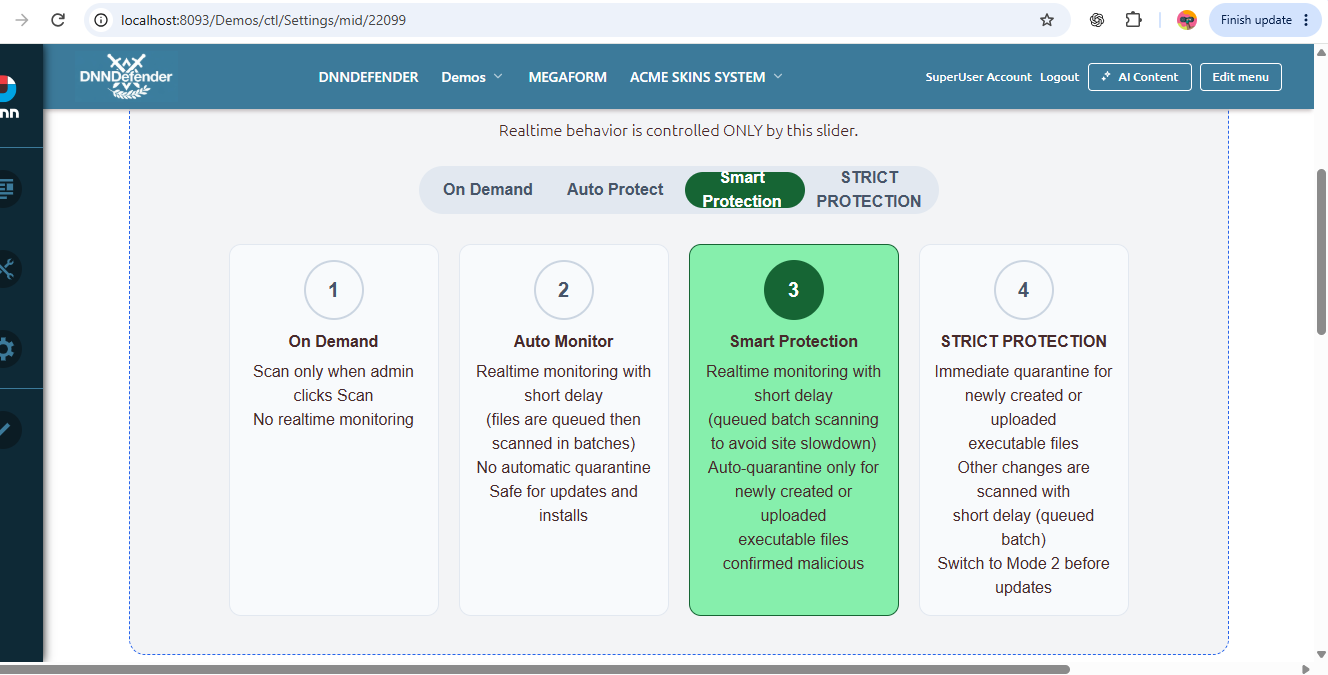
Screenshot: DNN Defender protection-mode controls from an earlier local build. It illustrates the administrator's mode choice; it is not a screenshot of the two-sample test and does not establish which mode was active in that test.
What administrators should verify
After reviewing the initial scan and baseline, check the site's active protection mode, scheduler/watcher health, scanned paths, upload policy, quarantine events and email recipients. For a suspected compromise, retain the original file safely, review the full scan finding and its rule evidence, then investigate how the file arrived and whether IIS ever executed it. Apply DNN and third-party module updates to close the entry point. A clean upgrade alone does not remove an implant that was already present.
Lab identification: SHA-256 B268356521C055A85FE439EDEC9DFE2BA0CDE072BF976A0E726D0AC161B3D074 (reverse TCP); 48AB098FDF2DF49CB79880D67DAEA425CE49166FB29535FF6C0AD3751FE77877 (Antak). No shellcode bytes, executable upload or command payload are provided here.