Keep the ACME Events design while reading published event records from a customer-owned SQL table through a bounded 2sxc data source.
Not rated yet
The ACME All Upcoming Events component can keep its finished card design, category filters, search, responsive behavior, and empty state while reading live event records from a SQL table already owned by the customer application. Only the data source changes; the visual contract remains under ACME and 2sxc.
Existing-table workflow: this guide does not create, seed, migrate, or take ownership of a customer database table. A developer first confirms the existing schema, then maps its columns through a bounded read-only query on a staging site.
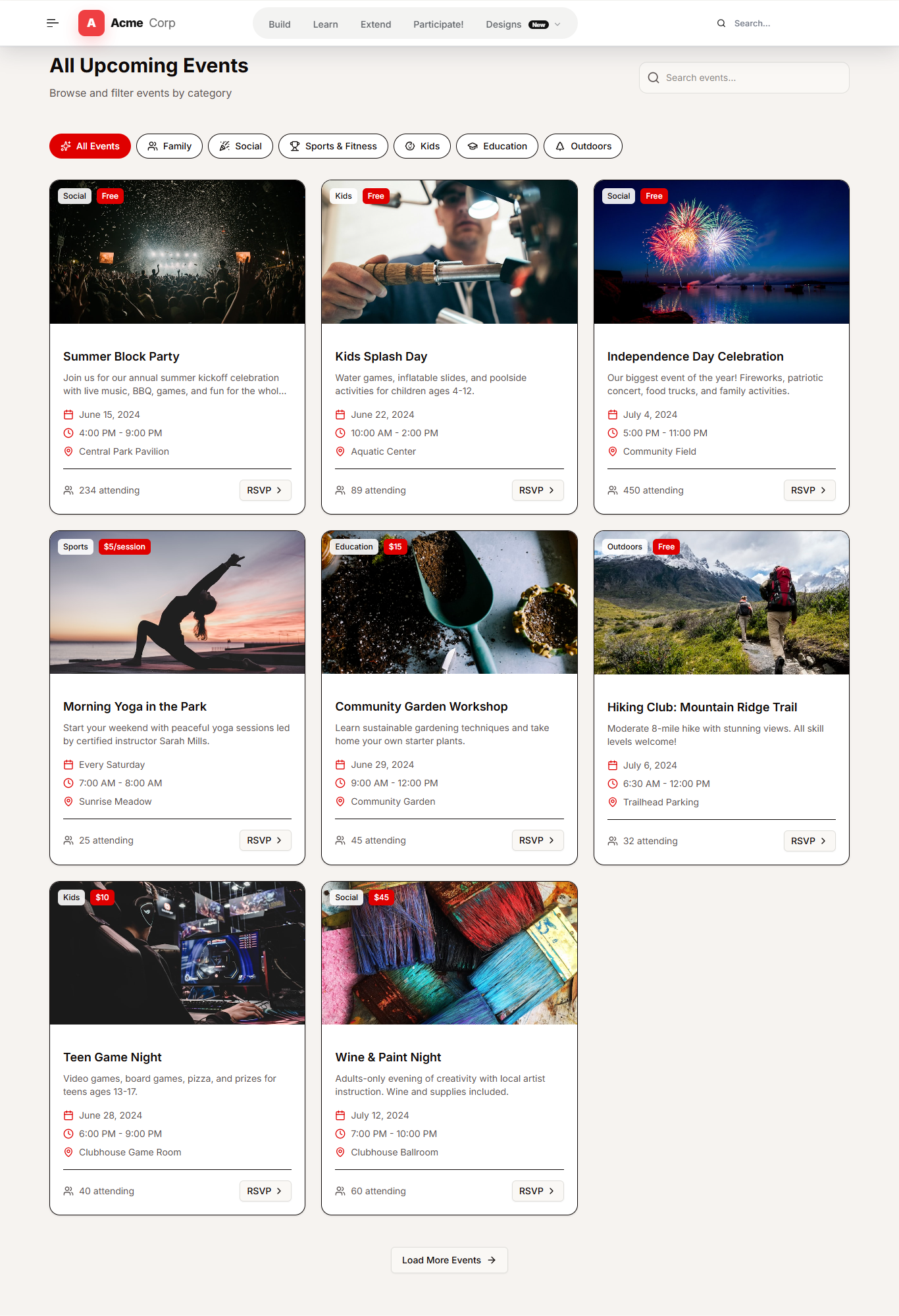 The existing ACME presentation is preserved while repeated event records can come from a customer-owned SQL source.
Confirm the existing source contract
Agree on the source before editing Razor. The example below expects an existing dbo.Events table, but the real table or database view may use different names. Map the customer schema instead of changing it merely to match this sample.
| Purpose | Example source column | ACME value |
|---|
| Stable record key | EventId | EntityId |
| Card heading and summary | Title, Summary | Title, Description |
| Schedule | StartDate, EndDate | Date, Time |
| Classification | Category, PriceLabel | Category, Price |
| Place and attendance | Venue, AttendeeCount | Location, Attendees |
| Media and action | ImageUrl, RegistrationUrl | Image, Link |
| Visibility and order | IsPublished, IsFeatured, SortOrder | Query filters and ordering |
Duplicate the existing 2sxc view
Do not rewrite the page from scratch. Duplicate the maintained Events view, preserve the acme-events root, card markup, CSS classes, client-side filtering hooks, image behavior, and empty state, then replace only the item-loading block. Keeping the same DOM contract lets the existing ACME stylesheet and JavaScript continue to work.
Read a bounded SQL result
Use the named DNN connection SiteSqlServer, a fixed maximum row count, deterministic ordering, and explicit publish/date filters. Do not place a connection string in Razor and do not concatenate visitor input into the SQL command.
@inherits Custom.Hybrid.RazorTyped
@using ToSic.Eav.DataSources
@using System.Linq
@{
  var command = @"
    SELECT TOP (60)
      EventId AS EntityId,
      Title AS EntityTitle,
      Title,
      Summary AS Description,
      StartDate,
      EndDate,
      Venue AS Location,
      Category,
      PriceLabel AS Price,
      AttendeeCount,
      ImageUrl AS Image,
      ImageAlt,
      RegistrationUrl AS Link,
      RegistrationLabel AS LinkLabel,
      IsFeatured
    FROM dbo.Events
    WHERE IsPublished = 1
      AND StartDate >= DATEADD(day, -1, CAST(GETDATE() AS date))
    ORDER BY IsFeatured DESC, SortOrder, StartDate, EventId;";

  var sql = Kit.Data.GetSource<Sql>(parameters: new {
    ConnectionStringName = "SiteSqlServer",
    SelectCommand = command,
    ContentType = "CustomerEvent",
    EntityIdField = "EntityId",
    EntityTitleField = "EntityTitle"
  });

  var events = AsItems(sql.List, propsRequired: false).ToList();
}
For teams that prefer configuration outside Razor, place the same bounded SQL source in a named 2sxc VisualQuery and retrieve that query from the view. Both approaches turn SQL rows into 2sxc data items; VisualQuery is easier to inspect and reuse across views.
Map rows to the established card fields
Normalize dates, times, nullable attendance, badges, and image URLs before rendering. Encode values through Razor output and use the existing card loop. SQL-backed records are read-only in this view, so do not render an item edit toolbar that suggests the row can be changed by 2sxc.
@foreach (var item in events) {
  <article class="acme-events__card" data-events-card>
    <div class="acme-events__media">
      <img src="@item.Url("Image")"
           alt="@item.String("ImageAlt")" loading="lazy" />
    </div>
    <div class="acme-events__body">
      <span class="acme-events__category">@item.String("Category")</span>
      <h3>@item.String("Title")</h3>
      <p>@item.String("Description")</p>
      <a class="acme-events__link" href="@item.Url("Link")">
        @item.String("LinkLabel")
      </a>
    </div>
  </article>
}
Keep presentation settings editor-owned
The database should supply event records, not every design decision. Keep the section title, subtitle, search placeholder, empty message, color theme, and selected view as normal structured 2sxc fields. Editors can then adjust presentation copy without receiving database access.
If the existing table stores public image URLs, validate their schemes and provide a fallback image. If it stores DNN file IDs or portal-relative paths, resolve those values through a small mapping layer. Keep image dimensions stable, supply useful alternative text, and avoid loading original-size uploads into card thumbnails.
 Responsive QA must cover the same data-backed view at mobile width, including filters, images, text wrapping, and actions.
Validate before deployment
- Run the SELECT with the customer's real schema and confirm that it remains read-only.
- Test no rows, one row, sixty rows, null optional values, long titles, expired events, and unpublished events.
- Confirm category filters and text search operate on the SQL-backed cards.
- Verify registration links, image fallbacks, date formatting, deterministic order, and the featured state.
- Measure query time and decide whether output caching is appropriate for the site's update frequency.
- Test signed-in and signed-out rendering at desktop and mobile widths with no console errors or horizontal overflow.
- Package the Razor or VisualQuery change from maintained source control; do not leave the only copy in a production portal.
The local DNN 10.3.3 QA used a temporary fixture only to exercise this mapping. After testing, the module was restored to its normal source. Customer deployments must point the copied view to a table or database view already provided and maintained by that customer.