Realtime Monitor, quarantine, and Clear Logs
Configure realtime monitoring, understand when quarantine is allowed, and safely clear event and quarantine records.
Not rated yet
Realtime Monitor watches relevant file-system changes and submits protected server-side artifacts
to the scanner. The watcher is intentionally narrower than a general file indexer: normal .js,
.map, CSS, images, documents, cache files, and DNN installation metadata do not belong in the
web-shell scan stream.
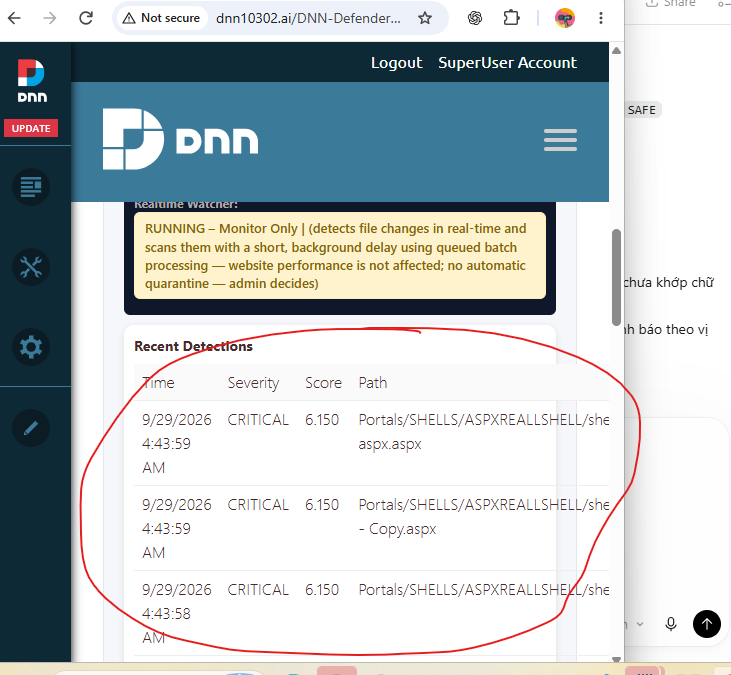 Actual module screen: Realtime Monitor presents the decision, score, time, and affected path for protected server-side changes. The displayed sample data is illustrative; administrators must review evidence on their own site.
This is the bridge between prevention and persistence control. If an attacker uses a new or custom
application flaw to write ASPX/ASHX/ASMX, server templates, managed assemblies, configuration, or
other executable content, the change is immediately routed into the same Smart/Strict/Alert and
three-layer analysis used by a full scan. A confirmed payload can be isolated while FIM records the
unauthorized change against the trusted baseline. The attacker cannot rely on “the first request
worked” as evidence that continuing access will remain hidden.
Monitor-only and protection behavior
In monitor-only operation, the module records and scores relevant changes without automatically
moving a file. In an enabled protection mode, a file is quarantined only when the scanner reaches
the documented malicious threshold or a dedicated path/upload policy requires isolation.
Unicode text inside ordinary file contents is not a quarantine reason. Unicode path protection is
limited to filename/path obfuscation patterns and supported attack vectors, such as hidden or
confusable executable extensions. A normal manifest, source map, or JavaScript file must not be
quarantined merely because it contains non-ASCII characters.
Quarantine workflow
- Review the original path, time, final decision, engine verdicts, rule ID, and evidence.
- Confirm whether the file was part of an approved deployment.
- Preserve a forensic copy when an incident is suspected.
- Restore only when the artifact is known-good and the destination is safe.
- Run a focused scan and review persistence locations, privileged accounts, WAF events, and DNN
logs before closing the incident.
Quarantine is not a substitute for incident response. A web shell may be only one component of an
intrusion.
Clear Logs
Clear Logs removes the selected DNN Defender scan/realtime event records and the corresponding
quarantine metadata/payload copies covered by that action. Because this destroys investigation
evidence and may remove the only module-held copy of a file, export required evidence first and
confirm that an external backup exists. Clearing logs does not approve the file, refresh the FIM
baseline, or prove the site is clean.
Was this page helpful?