Interpret version exposure, configuration findings, control coverage, and the difference between a compensating control and a vendor patch.
Not rated yet
Security Risk Analysis combines DNN-aware configuration auditing with the packaged DNN advisory
catalog. Production requests do not call GitHub: advisory metadata is synchronized during release
engineering, packaged with the module, and evaluated locally.
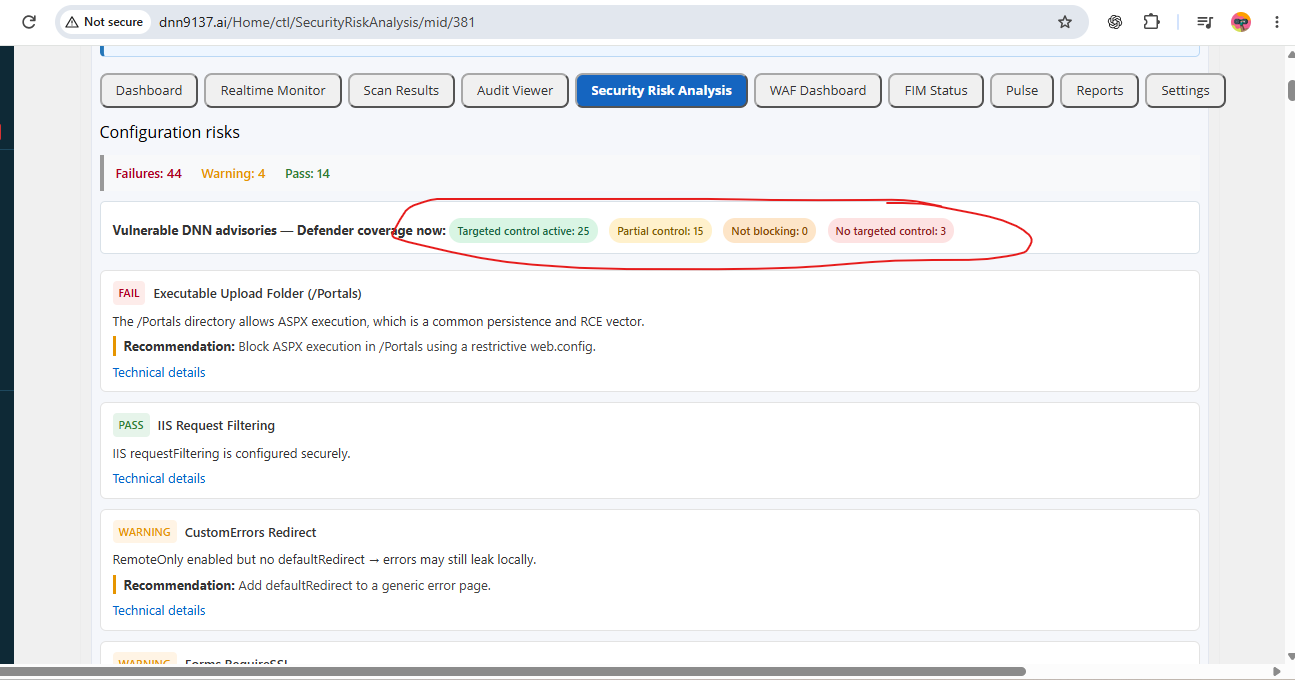 Actual module screen: advisory coverage pills summarize targeted, partial, disabled, and unavailable controls; each finding still needs its version, evidence, and remediation details. Counts vary with the installed build and configuration.
For release 03.03.00, the catalog contains all 47 official DNN Platform advisories synchronized
through 25 August 2026: 31 have assigned CVE identifiers and 16 are currently published under GHSA
identifiers only. No advisory is silently ignored. Each one is either matched to a targeted
control, matched to a partial compensating control, or explicitly marked as having no dedicated
virtual patch so the administrator can act on the vendor remediation.
Version comparison
The analyzer evaluates the official vulnerable version range before considering a fixed-version
fallback. A running version later than the published fix must not be described as “predating the
fix.” Each advisory row should show the running version, affected range, patched version when
published, severity, and authoritative technical link.
Coverage labels
- Targeted control active: a specific DNN Defender control is enabled and can enforce the
documented request/path behavior.
- Partial control: the module reduces one or more exploit paths but does not repair every
vulnerable DNN code path.
- Control available—disabled: relevant logic exists, but the current mode only observes or is
turned off.
- No targeted control: use the vendor mitigation/upgrade and other defense-in-depth layers;
DNN Defender must not imply dedicated protection.
The word FAIL means the DNN build or configuration is exposed according to the check. It does
not automatically mean the website has already been exploited. The adjacent control statement
explains whether DNN Defender blocks, partially mitigates, only observes, or has no targeted
control.
Configuration checks
The analyzer also reviews dangerous installation artifacts, executable upload folders, IIS
request filtering, custom errors/debug exposure, machine-key posture, registration and password
policy, privileged accounts, folder permissions, handler/API exposure, and other DNN-specific
hardening signals. Apply fixes through an approved change window and re-run the assessment.
Advisory control families
When the corresponding policy is enabled, Advisory Shield can provide targeted request-boundary
controls for registration approval and oversized payloads; DNN theme and site-import remote
sources; Journal SSRF, private-object access, and unsafe mutations; group and workflow ownership;
module-permission management; ProcessImage and restricted-file access; messaging attachments and
profile-picture privacy; friend-request ownership; anonymous or non-admin uploads; executable,
double-extension, SVG/SVGZ, and Unicode-obfuscated upload paths; stored/reflected XSS on supported
DNN write surfaces; SMB, file, loopback, and private-network targets; and forged forwarding
headers used against IP allowlists.
Across the synchronized catalog, 42 advisories currently map to a targeted or partial compensating
control. Open each advisory row to see whether the current result is Targeted control active,
Partial control, Control available—disabled, or No targeted control. Even when a
dedicated virtual patch is not possible at the HTTP boundary, version exposure is still detected.
For the five advisories with No targeted control, general WAF, scanner, Realtime Monitor, FIM,
quarantine, and audit controls may expose an individual exploit or persistence stage, but their
presence does not establish that the advisory's business-logic flaw is blocked. Use the vendor fix.
Upgrade fixes vulnerable core code; it does not eradicate compromise
Advisory Shield is a virtual patch at the request boundary. It cannot rewrite the vulnerable DNN
assembly, sanitize content stored before the control was enabled, or cover direct disk access and
unknown custom implementations. Upgrade to the vendor-fixed DNN version as soon as operationally
safe, while retaining DNN Defender as defense in depth.
The upgrade is the definitive correction for the affected vendor code, but it is not a malware
cleanup or forensic process. A web shell, unexpected DLL/module, altered web.config, privileged
account, scheduled task, database implant, stolen credential, or malicious file outside the
upgrade's replacement set can survive the upgrade. Do not close an incident because the displayed
DNN version is current.
After upgrading a site that may have been exposed, run the full three-layer scan, verify critical
files against trusted packages, inspect Realtime/WAF/Audit evidence and privileged identities, and
resolve every unexplained FIM difference. Establish a new baseline only after the resulting state
has been independently accepted as clean.
This boundary is also the product's practical value for DNN 9.x and 10.x sites that cannot upgrade
immediately. A delayed vendor upgrade does not have to mean an unmonitored, undefended window:
Strict/Prevention can close mapped request paths, while the three-layer scanner, Realtime Monitor,
FIM, quarantine, and audit controls continue to detect payload delivery and persistence behavior
that is independent of the exact DNN version.