Not rated yet
C# / Razor & SDK
Display composites, images, signatures and uploads. Download editable Razor examples.
Start here: show images, composites and files →
C# and Razor: show composites, images and uploaded files
Turn a MegaForm submission into a readable card. These examples use Typed Values or live SQL columns. You do not need to parse DataJson.
Download editable Razor examples (ZIP)
The ZIP contains a complete DNN submission reader, a read-only SQL reader and an English README. Requires MegaForm 2.0.68 or later, either the ASCX or MVC distribution, and DNN's Razor Host module.
What you will build
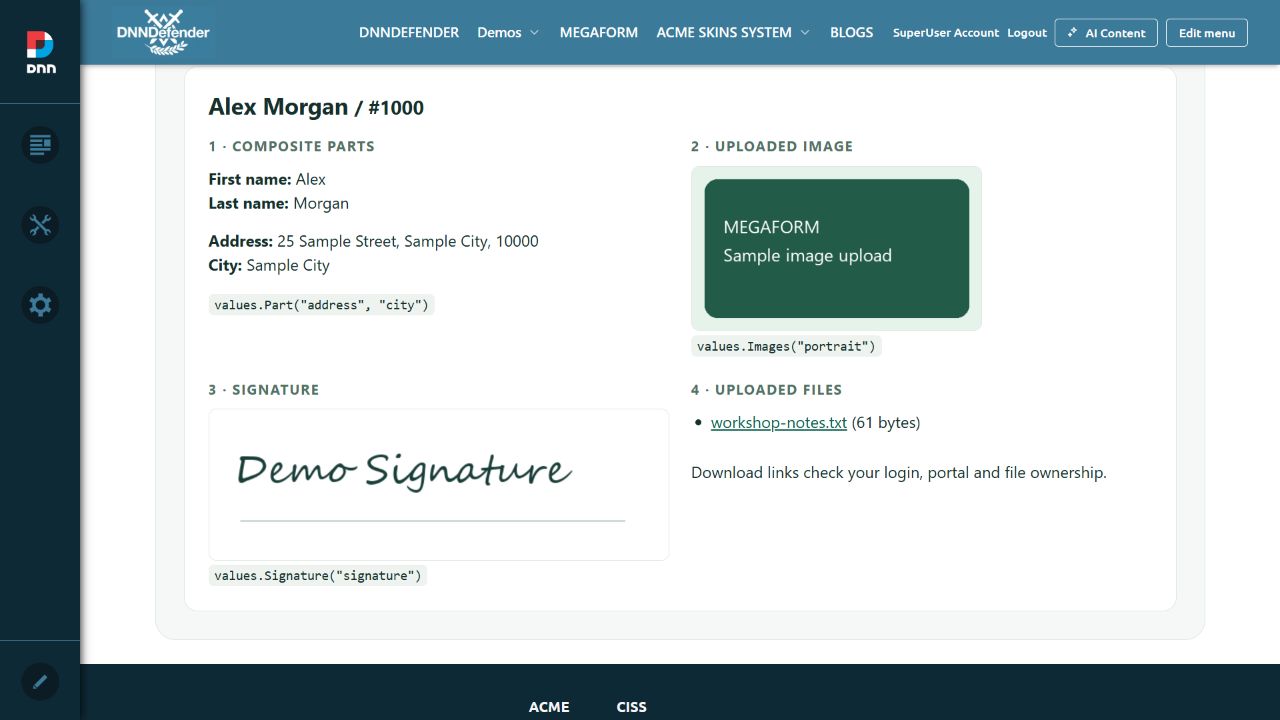 A real Razor Host page on the local DNN site. All data shown here is fictional. Click an image to view it at full size.
1. Install the sample and choose your form
- Download and unzip the examples. Copy
MegaFormSubmissionCards.cshtml into DesktopModules/RazorModules/RazorHost/Scripts/ on your server.
- Create a DNN page, add Razor Host and restrict the page and module to Administrators. In Razor Host settings select the copied script.
- Open the script. Set
const int FormId = 0; to your form's numeric ID. Change the five field keys to match your form. Use the machine Key in field properties, rather than its visible label.
- Submit a test entry with a name, address, image, signature and attachment. Open the reader page while signed in as a portal administrator.
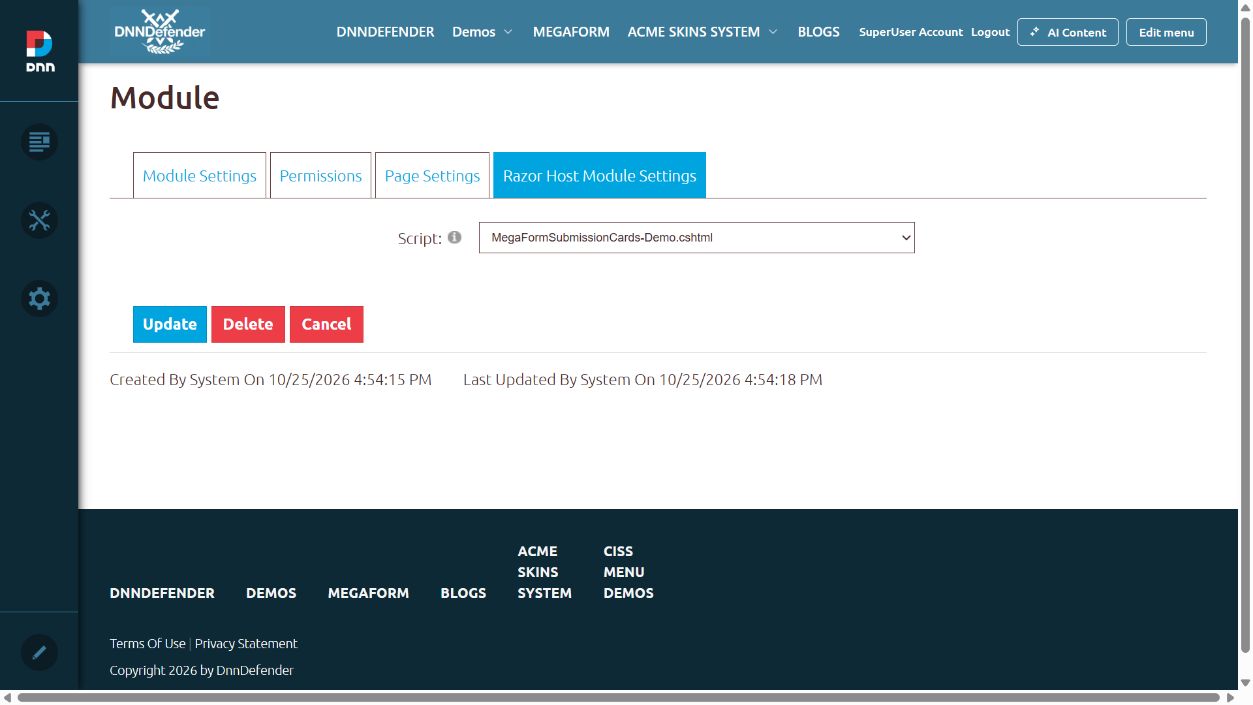 Select the script in Razor Host. This screenshot uses a separate demo copy with its form ID already configured.
// The only initial changes required in MegaFormSubmissionCards.cshtml:
const int FormId = 123; // replace with YOUR form ID
const string NameKey = "full_name", AddressKey = "address";
const string ImageKey = "portrait", SignatureKey = "signature", FilesKey = "attachments";
This is native server-side Razor. The restricted MegaForm Razor widget is a different environment and cannot run arbitrary SDK or .NET calls.
2. Read the record once
The complete sample checks the signed-in administrator and form portal before reading a page of 20 records. Inside its loop, these lines attach file metadata and protected download URLs:
var files = Run(c => c.Files.ListForSubmissionAsync(row.SubmissionId, scope));
var values = row.ReadValues(schema, files,
    f => Download(row.SubmissionId, f.FileId));
Run, scope, schema and Download are included in the downloadable script. In asynchronous C# services, call the client with await instead of using the synchronous Razor bridge.
3. Display the values you need
| Show | C# helper |
|---|
| Full name or combined address | values.Text("full_name") |
| First name / last name | values.Part("full_name", "first") / values.Part("full_name", "last") |
| One address component | values.Part("address", "city", "Not supplied") |
| Uploaded images or image URLs | values.Images("portrait") |
| Signature image | values.Signature("signature") |
| Attachments | Filter files by FieldKey; show FileName and its authorized download link. |
<p>@values.Part("full_name", "first") @values.Part("full_name", "last")</p>
<p>City: @values.Part("address", "city", "Not supplied")</p>

@foreach (var url in values.Images("portrait")) {
    <img src="@url" alt="Submitted image" />
}
@if (values.Signature("signature") != null) {
    <img src="@values.Signature("signature")" alt="Submitted signature" />
}
@foreach (var file in files.Where(f => f.FieldKey == "attachments")) {
    <a href="@Download(row.SubmissionId, file.FileId)">@file.FileName</a>
}
Composite parts: the preset name keys are first and last; address includes street and city. Custom composites use their configured part keys. HasParts("address") tells you whether separate parts were stored. An old combined string cannot reliably recover its original parts; display Text() or supply an explicit mapping.
Images and signatures: the helper supports accepted raster URLs, upload metadata and PNG/JPEG/GIF/WebP data URIs. A file upload needs the file list and URL factory above. A signature may be stored as image data rather than as an uploaded file.
4. Read an existing SQL table
A form bound through MegaForm can use the same SDK reader: its record data comes from live columns. If the column names differ, map them to your display field names. For a custom, authorized SQL query, wrap the returned column dictionary:
var values = columns.ReadValues()
    .MapPart("address", "street", "AddressStreet")
    .MapPart("address", "city", "AddressCity")
    .MapField("portrait", "PortraitUrl")
    .MapField("signature", "SignatureData");

// The Razor markup stays the same.
var city = values.Part("address", "city");
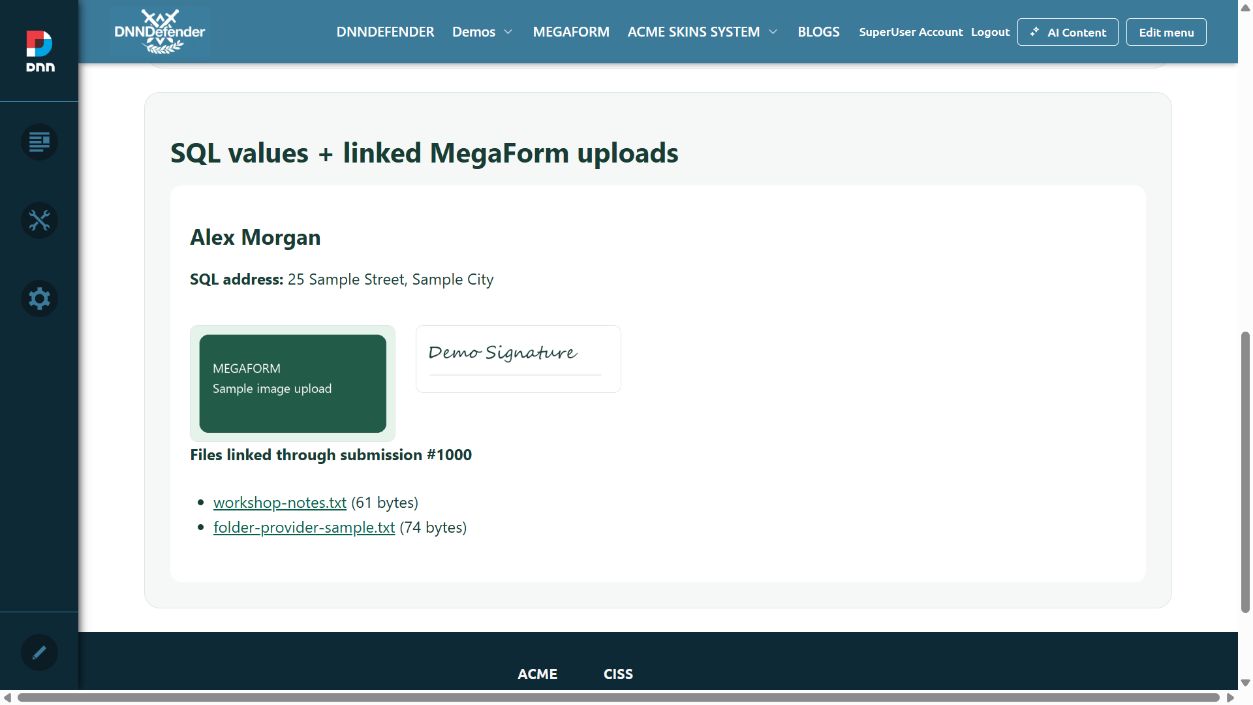 The SQL example reads address columns and a binary signature, then resolves its submission link for uploaded files. Mapping changes the in-memory view; it does not change your SQL table.
MegaFormSqlCards.cshtml starts disabled. Adapt its fixed table/column names and portal/row filter, then enable it. It uses a parameterized SELECT and never inserts, alters or deletes data. A trusted custom query can also return raster byte[] image/signature columns; the generic bound-table browser excludes BLOB columns.
SQL rows with uploaded files: the ZIP also includes MegaFormSqlLinkedUploads.cshtml. Set its LinkedFormId and adapt the fixed query to your existing SubmissionId foreign key. It checks the linked submission's form and portal, then combines the SQL values with protected file download links. It makes no changes to your table.
SQL list rows can have synthetic negative IDs. Those are display IDs, not submission-file IDs. Resolve the explicit positive submission anchor and authorize that relationship first. An application-owned SQL file foreign key requires your application's authorized download service.
Keep private uploads private
The DNN sample download endpoint checks login, portal and file/submission ownership. Never turn an App_Data path into a public URL. MegaFormScope supplies context; it does not grant permission. For a customer-facing reader, implement the customer's row and field permissions and its download endpoint before changing the audience. Keep submitted output HTML-encoded; do not use Html.Raw for these values.
Download the scripts and step-by-step README · Ask for help
SDK overview: typed records and display helpers
The DNN distribution includes MegaForm.Sdk. Use its client to read forms, submissions and file metadata from trusted server code. Use SubmissionDto.Data and ReadValues() to display the result.
Start with the illustrated example and downloadable Razor scripts. It covers composite names and addresses, images, signatures, attachments and SQL rows.
| Object | What it contains |
|---|
IMegaFormClient | The server API entry point. |
FormDto | Form ID, portal, title and schema. |
SubmissionDto.Data | A dictionary reconstructed from typed storage, or live bound SQL columns. |
SubmissionValueReader | Text, composite parts and accepted image/signature sources. |
FileDto | File ID, submission ID, field key, name, MIME type and size. |
PagedResult<T> | Items, total count, page and page size. |
The submission-wide DataJson property is a legacy compatibility member. Current examples do not parse it. Structured composite values may use per-field JSON internally; the display helper handles that representation.
Authorization belongs to your application. Resolve the portal and user from the verified request. Check the permitted form, rows and fields before calling the SDK. MegaFormScope carries context; its flags do not grant access.
For the current language catalog and translation steps, see Languages: 37 packs and adding translations.
Use the SDK included with MegaForm for DNN
- Install MegaForm DNN 2.0.68 or later, using either the ASCX or MVC installer. The matching SDK assembly is included.
- For a server-rendered example, add DNN's Razor Host module to an administrator-only page.
- Download the Razor samples, copy a script into Razor Host's Scripts folder, configure its form ID and select it in module settings.
Do not replace the installed SDK DLL with an older, independently selected NuGet version. Keep the DNN module, shared runtime and SDK versions together.
The native DNN sample initializes the host's existing SDK wiring through DnnServiceLocator.Instance, then uses MegaFormSdk.RunAsync. A separate compiled DNN module can reference the matching MegaForm.Sdk.dll and use the same facade. Other hosts must register their own platform repositories and authorization; that configuration is outside this DNN setup guide.
Razor Host setup · Read your first records
Quick start: read typed submissions
For a complete copy-and-edit page, use the illustrated Razor walkthrough. The following C# code shows the same read operation inside an asynchronous service.
// client: IMegaFormClient; scope: verified portal/user context.
// Authorize formId and the intended rows before this read.
var form = await client.Forms.GetFormAsync(formId, scope);
if (form == null) return;
var schema = client.Schema.ParseForm(form);
var page = await client.Submissions.FindAsync(
    new SubmissionQuery { FormId = formId, Page = 1, PageSize = 20 }, scope);

foreach (var row in page.Items) {
    var values = row.ReadValues(schema);
    var fullName = values.Text("full_name", "Not supplied");
    var city = values.Part("address", "city", "Not stored separately");
    // Pass these strings to your HTML-encoded view.
}
row.Data already contains the field dictionary. For composites, use Text() for the combined display and Part() for a stored component. There is no submission payload to deserialize in this example.
DNN Razor Host uses the synchronous Run(...) bridge included in the downloadable script. Do not paste an asynchronous controller method directly into a native Razor Host view.
Next: attach authorized file links, or read SQL and composite values.
Reading data: fields, composite parts and SQL columns
Use Submissions.FindAsync for a page of records and Submissions.GetAsync for one positive submission ID. Supply the verified portal scope and enforce your application's row and field access rules first.
var row = await client.Submissions.GetAsync(submissionId, scope);
if (row == null) return;
var values = row.ReadValues(schema);
var name = values.Text("full_name");
var first = values.Part("full_name", "first", "Not stored separately");
var city = values.Part("address", "city", "Not supplied");
Do not split a combined name or address to guess its original components. HasParts(key) indicates whether parts were stored. Older combined strings can still be displayed with Text(key).
SQL-backed forms and custom queries
A bound form's SDK records read live SQL columns. If your query returns a column dictionary, wrap it directly and map names in memory:
var values = columns.ReadValues()
    .MapPart("address", "street", "AddressStreet")
    .MapPart("address", "city", "AddressCity")
    .MapField("portrait", "PortraitUrl")
    .MapField("signature", "SignatureData");
The mapping does not alter the table. Keep queries fixed and parameterized, with a tenant/row filter. For a linked file, use an explicitly authorized positive submission foreign key; a synthetic SQL list ID is not a file/submission ID.
Build a custom table view
Choose an explicit list of fields your viewer may see. Use the schema's labels and values.Text(key) for those fields. Do not expose every dictionary key to an audience without a field-visibility policy. Keep reads paged and let Razor HTML-encode submitted text.
See screenshots and download the three working readers.
List and download uploaded files safely
A file field's displayed value is not a physical storage path. Ask the SDK for its file metadata, then build a URL to an endpoint that authorizes the viewer and file relationship.
var files = await client.Files.ListForSubmissionAsync(submissionId, scope);
foreach (var file in files) {
    // FileId, SubmissionId, FieldKey, FileName, ContentType, SizeBytes
    // Render FileName as encoded text and use an authorized download URL.
}
The DNN examples use /DesktopModules/MegaForm/API/Sdk/Download?submissionId=…&fileId=…. This endpoint requires a portal administrator, verifies the form's portal and file/submission relationship, and disables caching. Anonymous requests return 401. It supports the module's PrivateUploads storage and DNN Folder Provider references.
For another audience, implement its row/form/field authorization before opening the file. The SDK's Files.OpenAsync is a trusted server API; providing a scope does not itself authorize a file download. Never accept a storage path from a URL or expose a private upload directory.
For a SQL record, resolve its explicit positive submission foreign key and verify the expected form and portal first. The downloadable MegaFormSqlLinkedUploads.cshtml shows that complete flow.
Images, signature, composite and file examples with screenshots · Download source
DNN Razor Host: configure the submission reader
This is native server-side Razor, using the SDK included with MegaForm DNN 2.0.68+. It is separate from MegaForm's restricted Razor widget.
- Restrict the DNN page and Razor Host module to Administrators.
- Copy
MegaFormSubmissionCards.cshtml from the sample ZIP into DesktopModules/RazorModules/RazorHost/Scripts/. - Set the numeric
FormId and the five field keys at the top of the script. - Select the script under Razor Host Module Settings → Script, update the module and open the page as an administrator.
The script verifies the administrator and portal before reading, then calls ReadValues() on the returned records. It supplies the SDK file list and an authorized download URL factory for uploaded images and attachments.
Open the configuration screenshot and complete walkthrough. Use the included Run helper as supplied; do not add a second SDK container or parse a legacy submission payload.
Three editable Razor examples
Download the examples and README
| Script | Use it for | Configure first |
|---|
MegaFormSubmissionCards.cshtml | Typed submissions or a MegaForm-bound SQL source: composite parts, images, signature and files. | Form ID and field keys. |
MegaFormSqlCards.cshtml | A custom read-only SQL query, separate composite columns and binary media. | Fixed query, tenant filter and Enabled flag. |
MegaFormSqlLinkedUploads.cshtml | SQL columns plus files related through a positive MegaForm submission foreign key. | Fixed query, tenant filter, LinkedFormId and Enabled flag. |
All three scripts were rendered through native DNN Razor Host with fictional local test data. The typed reader displayed a name/address, image and signature; attachments were downloaded from both PrivateUploads and DNN Folder Provider storage. The linked SQL reader also downloaded its related attachment. The public ZIP contains no test submissions, credentials or license file.
The scripts limit reads to 20 rows. They are administrator examples; implementing a different audience requires that audience's authorization and field visibility rules. Modify the markup and scoped CSS for your design. See the actual screenshots.
A MegaForm template is a single JSON file that describes everything a form needs: its fields, layout, styling, validation rules, workflow, and runtime behaviour. Templates are portable across MegaForm hosts (Oqtane, DNN, Umbraco, ASP.NET Core) and can be imported into the Form Builder or stored directly in the MF_Forms / MF_Templates tables.
This document describes the full schema, using the euro-youth-application.json template as the running example.
Scope of this guide: the template file format. For the runtime database schema, see the SDK and data-layer documentation.
1. Top-level structure
{
  "version": "1.0",
  "slug": "euro-youth-application",
  "title": "EuroYouth 2026 Application",
  "description": "Apply for European youth mobility programmes...",
  "category": "event-registration",
  "categories": ["event-registration", "premium", "youth-programme"],
  "icon": "globe-2",
  "submitButtonText": "Submit application",
  "successMessage": "Application received. We will email you within 5 working days.",
  "fields": [ /* ... */ ],
  "customHtml": "<div class='mfp mfp-euro-youth'>...</div>",
  "customCss": ".mfp.mfp-euro-youth { ... }",
  "settings": { /* ... */ },
  "customScripts": { "euro_youth_wizard": "(function(root){...})" },
  "rules": [],
  "workflow": { "notifications": [] },
  "themeSelector": { "enabled": false }
}
| Property | Type | Required | Description |
|---|
version | string | yes | Template format version. Current value: "1.0". |
slug | string | yes | URL-friendly, unique identifier. Used as file name and internal key. |
title | string | yes | Human-readable form title. |
description | string | no | Short description shown in the template gallery. |
category | string | no | Primary category for filtering. |
categories | string[] | no | Additional tags. |
icon | string | no | Icon name used by the template card. |
submitButtonText | string | no | Label of the submit button. |
successMessage | string | no | Message shown after a successful submission. |
fields | Field[] | yes | The editable questions/controls of the form. |
customHtml | string | no | Complete replacement HTML for the form shell. Supports {{script:name}} tokens. |
customCss | string | no | Styles injected into the page when the form renders. |
settings | object | no | Theme, multi-page, custom content, scripts, and rules scoped to the design. |
customScripts | object | no | Named scripts referenced by {{script:name}} tokens. |
rules | Rule[] | no | Runtime validation / visibility rules. |
workflow | object | no | Notifications and workflow configuration. |
themeSelector | object | no | Whether the end-user can switch themes. |
2. Field schema
Each item in fields describes one user input. The most common shape is:
{
  "key": "first_name",
  "type": "Text",
  "label": "First name",
  "required": true,
  "placeholder": "Anna",
  "defaultValue": "",
  "cssClass": "",
  "width": "100%",
  "readOnly": false,
  "properties": {},
  "options": []
}
2.1 Common field properties
| Property | Type | Description |
|---|
key | string | Unique field name, used as the submission key and name attribute. |
type | string | Control type. See table below. |
label | string | Visible label. |
required | bool | Whether the field must be filled. |
placeholder | string | Placeholder text. |
defaultValue | any | Pre-selected value. |
cssClass | string | Extra CSS class appended to the field wrapper. |
width | string | Visual width token, e.g. "100%", "50%". |
readOnly | bool | Render as disabled/read-only. |
helpText | string | Helper text shown under the label. |
properties | object | Type-specific options (rows, maxLength, etc.). |
options | Option[] | Choices for Select / Radio / Checkbox. |
validation | object | Per-field validation rules. |
showIf | object | Conditional visibility rule. |
2.2 Supported field types
| Type | Purpose | Notes |
|---|
Text | Single-line text input | Most common. |
Email | Email input with validation | Adds type="email". |
Phone | Phone input | May include country selector. |
Number | Numeric input | Use properties.min, properties.max. |
Date | Date picker | |
Textarea | Multi-line text | properties.rows, properties.maxLength. |
Select | Dropdown | options required. |
Radio | Single choice | options required; optionDisplay controls rendering. |
Checkbox | Multiple choices / single consent | options required; optionDisplay: default, chips, cards. |
File | File upload | fileSettings object. |
Html | Static HTML block | htmlContent property. |
Hidden | Hidden input | Used for pre-fill or tracking. |
2.3 Options
{
  "label": "Germany",
  "value": "Germany",
  "description": "Study in Germany",
  "icon": "🇩🇪",
  "meta": "Berlin · Munich"
}
| Property | Description |
|---|
label | Display text. |
value | Stored submission value. |
description | Subtitle shown under the label. |
icon | Optional icon or emoji. |
meta | Optional extra line, e.g. city list. |
optionDisplay values:
default — native control rendering.cards — card-style selectable blocks.chips — pill-style toggle chips.
2.4 Properties examples
// Textarea
"properties": { "rows": 4, "maxLength": 500 }

// Number
"properties": { "min": 18, "max": 99 }

// Date
"properties": { "min": "2026-01-01", "max": "2026-12-31" }
3. Custom HTML, CSS, and Scripts
Premium templates usually replace the default MegaForm renderer with a completely custom shell.
3.1 customHtml
A full HTML fragment that becomes the form body. It can contain {{script:name}} placeholders that the renderer expands at runtime.
<div class='mfp mfp-euro-youth' data-ey-wizard='1'>
  {{script:euro_youth_wizard}}
  <div class='ey-shell'>
    <aside class='ey-hero'>...</aside>
    <section class='ey-panel'>...</section>
  </div>
</div>
Rules:
- The outer element should carry both
mfp and a theme class (mfp-euro-youth). - Field inputs are rendered where MegaForm injects them; custom HTML normally wraps
{{field:key}} markers or relies on the renderer placing fields inside matching containers. - Scripts referenced by
{{script:name}} are taken from customScripts.
3.2 customCss
Injected as a <style> block when the form renders. It can:
- Style the custom shell (hero, stepper, cards).
- Hide default MegaForm chrome:
.mf-form-title, .mf-form-description, .mf-form-actions { display:none !important; }. - Override host container CSS.
Important: MegaForm injects its own default CSS with selectors such as .mf-form-wrapper > .mf-form-inner .mfp { max-width:none !important; ... }. If you want a contained layout, your custom CSS must be more specific than the default rule, e.g. ``css .mf-form-wrapper > .mf-form-inner .mfp.mfp-euro-youth { width: 100% !important; max-width: 1152px !important; margin: 0 auto !important; padding: 16px !important; } ``
3.3 customScripts
A dictionary of named scripts. Each value is a minified IIFE.
"customScripts": {
  "euro_youth_wizard": "(function(root){ ... })(window.__mfCurrentScriptRoot || document);"
}
Best practices:
- Bind once per host (
host.__eyWizardBound). - Avoid overriding
width, max-width, margin, padding, position, inset, z-index, height to full-viewport values unless you truly intend a full-bleed layout. - Use CSS classes for styling; reserve scripts for behaviour (step navigation, validation helpers, summary updates).
4. settings object
The settings object is a duplicate/override layer. MegaForm reads both top-level properties and settings.* properties; the exact precedence depends on the host version, so keep them in sync.
"settings": {
  "theme": "euro-youth-premium",
  "multiPage": false,
  "customContent": {
    "hero_image": "/Modules/MegaForm/img/euro-youth/euro-youth-hero.png"
  },
  "customHtml": "<div class='mfp mfp-euro-youth'>...</div>",
  "customCss": ".mfp.mfp-euro-youth { ... }",
  "customScripts": { "euro_youth_wizard": "..." },
  "themeSelector": { "enabled": false },
  "rules": [],
  "workflowTemplate": { ... }
}
| Property | Description |
|---|
theme | Theme key used by the renderer to pick base CSS. |
multiPage | Whether the form is split into pages/tabs. |
customContent | Key/value pairs referenced by custom HTML (images, strings, URLs). |
customHtml | Duplicate of top-level customHtml. |
customCss | Duplicate of top-level customCss. |
customScripts | Duplicate of top-level customScripts. |
themeSelector | { "enabled": true/false } allowing end-users to switch themes. |
rules | Runtime rules, also duplicated at root. |
workflowTemplate | Workflow configuration, also duplicated at root workflow. |
5. Rules and workflow
5.1 Rules
Rules control field visibility, validation, and calculated values.
"rules": [
  {
    "name": "hide-motivation-for-volunteer",
    "condition": { "field": "programme", "operator": "neq", "value": "volunteer" },
    "action": { "type": "hide", "field": "motivation" }
  }
]
Common operators: eq, neq, contains, gt, lt, empty, notEmpty. Common actions: show, hide, require, optional, setValue, addError.
5.2 Workflow
"workflow": {
  "notifications": [
    {
      "to": "{{form.email}}",
      "subject": "Application received",
      "body": "Hi {{form.first_name}}, ..."
    }
  ]
}
6. Case study: euro-youth-application.json
The Euro Youth template is a premium, wizard-style form. Its original design intentionally spanned the full viewport (full-bleed). The snippet below shows the containerized version, safe for embedding inside a normal page.
6.1 Containerized custom CSS (excerpt)
.mfp.mfp-euro-youth {
  font-family: 'Inter', system-ui, -apple-system, 'Segoe UI', sans-serif;
  color: #1c1917;
  background: #f5f5f4;
  width: 100% !important;
  max-width: 1152px !important;
  margin: 0 auto !important;
  padding: 16px !important;
  box-sizing: border-box;
  overflow: visible !important;
}

.mfp-euro-youth .ey-shell {
  display: grid;
  min-height: auto;
  max-width: 1152px;
  margin: 0 auto;
  background: #f5f5f4;
}

/* Override MegaForm default full-bleed rule */
.mf-form-wrapper > .mf-form-inner .mfp.mfp-euro-youth {
  width: 100% !important;
  max-width: 1152px !important;
  margin: 0 auto !important;
  padding: 16px !important;
  background: #f5f5f4 !important;
  box-sizing: border-box !important;
}
6.2 Wizard script (behaviour only)
(function(root){
  var host = (root && root.closest && root.closest('.mfp-euro-youth'))
          || (root && root.querySelector && root.querySelector('.mfp-euro-youth'))
          || document.querySelector('.mfp-euro-youth');
  if (!host || host.__eyWizardBound) return;
  host.__eyWizardBound = true;

  function fitHost() {
    /* windowed layout: no full-bleed overrides */
  }
  fitHost();

  var current = 0;
  var pages = [].slice.call(host.querySelectorAll('.ey-page'));
  // ... step navigation, validation, summary logic ...
  show(0);
})(window.__mfCurrentScriptRoot || document);
Key change: fitHost() no longer sets width:100vw, height:100vh, position:fixed, or injects a navbar-hiding stylesheet.
7. Best practices
- Keep
customHtml, customCss, and customScripts in sync between root and settings. - Do not mix full-bleed and containerized CSS. Pick one layout strategy and apply it consistently.
- Use high-specificity selectors when you need to override MegaForm defaults.
- Scope all custom CSS under the theme class (
.mfp-euro-youth) to avoid leaking into other forms on the same page. - Minify scripts before saving to reduce JSON size, but keep an un-minified copy in source control for maintenance.
- Version your templates. Bump
version when the schema changes significantly. - Validate JSON before importing; a trailing comma or unescaped quote in
customHtml will break the renderer.
SDK reading and display reference
Current DNN examples target the SDK bundled with MegaForm 2.0.68+. Calls below run in trusted server code after application authorization.
| API | Purpose |
|---|
client.Forms.GetFormAsync(formId, scope) | Get the form and its schema. |
client.Schema.ParseForm(form) | Parse schema field metadata and labels. |
client.Submissions.FindAsync(query, scope) | Read a bounded page of typed/bound records. |
client.Submissions.GetAsync(id, scope) | Read one positive submission ID. |
row.Data | The field dictionary. Prefer the display wrapper for composites and media. |
row.ReadValues(schema, files, fileUrl) | Create the display wrapper over typed values or bound SQL columns. |
client.Files.ListForSubmissionAsync(id, scope) | Get upload metadata. |
client.Files.OpenAsync(id, fileId, scope) | Read file content after your application authorizes its relationship. |
Display helpers
| Helper | Result |
|---|
Text(key, fallback) | Plain text, including choice labels and combined composite values. |
HasParts(key) | Whether structured composite parts are available. |
Part(key, partKey, fallback) | One stored component; no guessing or splitting. |
Images(key) | Accepted raster sources, including authorized upload URLs supplied by the caller. |
Signature(key) | The first accepted signature source, or null. |
MapField(fieldKey, columnName) | A new reader with one SQL column alias. |
MapPart(fieldKey, partKey, columnName) | A new reader with one SQL column mapped to a composite component. |
SubmissionDto.DataJson remains obsolete compatibility surface and may be empty. Do not deserialize it in new views. Use Data, ReadValues() or a trusted SQL column dictionary.
Writing records and workflows
The client also exposes form/record mutation, application queries, dashboards and workflow tasks. Those are server application capabilities, not an automatic permission grant. Use validated field dictionaries and the platform's configured submission pipeline when writing, and review the current interfaces for your installed version. The three downloadable examples deliberately perform reads only.
Authorized file downloads · Illustrated walkthrough and source download
API Stability
The whole point of the SDK is to give integrators a surface that does not break while the MegaForm engine changes underneath it. Five layers enforce that.
Layer 1 — A deliberately small surface
The SDK exposes only interfaces (IMegaFormClient, IFormApi, ISubmissionApi, IDashboardApi, ISubmissionDashboardApi, IInboxApi, IFileApi, ISchemaApi), DTOs, and queries. It never exposes MegaForm's internal entities, repositories, EF context, or rendering pipeline. The smaller the surface, the less there is to break.
Layer 2 — Roslyn public-API analyzers
MegaForm.Sdk enables Microsoft.CodeAnalysis.PublicApiAnalyzers with the two key rules promoted to build errors:
<WarningsAsErrors>$(WarningsAsErrors);RS0016;RS0017</WarningsAsErrors>
- RS0016 — a public member was added but not recorded in
PublicAPI.*.txt → build fails. - RS0017 — a public member was removed that is still declared in
PublicAPI.*.txt → build fails.
The public surface is tracked in two checked-in files:
PublicAPI.Shipped.txt — the API already released (frozen).PublicAPI.Unshipped.txt — additions staged for the next release.
Any accidental change to the public contract breaks the build until a human deliberately edits these files. Adding API is allowed (record it in Unshipped); changing or removing API is what the analyzer stops.
Note
dotnet format cannot reliably update PublicAPI.*.txt on a multi-targeted (net472+net8/9/10)
project — edit it by hand, mirroring the exact signature format of existing entries, e.g.
MegaForm.Sdk.IFileApi.OpenAsync(int submissionId, int fileId, MegaForm.Sdk.MegaFormScope? scope = null, System.Threading.CancellationToken cancellationToken = default(System.Threading.CancellationToken)) -> System.Threading.Tasks.Task<MegaForm.Sdk.MegaFormFileContent?>!
Layer 3 — Contract tests
MegaForm.Sdk.Tests exercises the facade against in-memory repository fakes, pinning behavior (paging, scope resolution, file round-trip) independently of the storage backend. These tests fail if a refactor silently changes observable behavior, even when the signature is unchanged.
Layer 4 — Package validation
The project sets EnablePackageValidation, which verifies on pack that every target framework (net472/net8/net9/net10) exposes a consistent public API. Once a version is published, setting PackageValidationBaselineVersion additionally flags binary-breaking changes against the last release.
Layer 5 — Semantic versioning
The package follows SemVer:
- Patch (
0.1.x) — bug fixes, no surface change. - Minor (
0.x.0) — additive only (new members recorded in PublicAPI.Unshipped.txt). - Major (
x.0.0) — the only releases allowed to change or remove existing API.
What this means for you
- Code against the interfaces and DTOs; treat everything else as off-limits.
- A minor/patch SDK upgrade will not require code changes.
- When you upgrade across a major version, the changelog will list exactly which contract members changed — there are no silent breaks.
See the master plan in Docs/FUTURE_PLAN_MEGAFORM_SDK_AND_DOCS.md for the full strategy.
Standalone Host
MegaForm can run as a standalone ASP.NET Core application via the MegaForm.AspNetCore.Component NuGet package. This is the same component that powers the MegaForm.Web.Host dev host and the Samples/AspNetCoreHost demo.
Install
Add the package to your host:
<ItemGroup>
  <PackageReference Include="MegaForm.AspNetCore.Component" Version="0.2.0-preview" />
</ItemGroup>
If you are consuming local packages during development, add a nuget.config:
<configuration>
  <packageSources>
    <clear />
    <add key="local" value="..\dist\pack" />
    <add key="nuget.org" value="https://api.nuget.org/v3/index.json" />
  </packageSources>
</configuration>
Minimal host
using MegaForm.AspNetCore.Component;

var builder = WebApplication.CreateBuilder(args);
builder.AddMegaForm();

var app = builder.Build();
app.EnsureMegaFormDatabaseReady();
app.UseMegaForm();
app.Run();
This gives you:
- Admin dashboard at
/admin - Setup wizard at
/setup (first run) - Public form renderer at
/f/{formId} - API endpoints at
/api/MegaForm/* - Static assets at
/megaform/*
With options
builder.AddMegaForm(options =>
{
    options.UseSqlServer("Server=.;Database=MegaForm;Trusted_Connection=true;");
    options.UseMegaFormAuthentication = true;
    options.AuthenticationSchemeName = "MegaFormAuth";
    options.LoginPath = "/admin/login";
    options.UseSwagger = builder.Environment.IsDevelopment();
    options.JwtKey = builder.Configuration["Jwt:Key"];
});
Use builder.AddMegaForm(...) (not just builder.Services.AddMegaForm(...)). The builder extension also calls UseStaticWebAssets() so static assets are served in every environment.
Important options
| Group | Property | Default | Notes |
|---|
| Database | DatabaseProvider, ConnectionString, ConfigureDbContext | SQL Server | Also supports SQLite, PostgreSQL, MySQL |
| Routes | ApiRoutePrefix, PopupApiRoutePrefix, AiApiRoutePrefix, AdminRoutePrefix, SetupRoutePrefix, FormRoutePrefix, DocumentsRoutePrefix | /api/MegaForm, /api/MegaFormPopup, /api/MegaFormAi, /admin, /setup, /f, /documents | All prefixes are configurable |
| Auth | UseMegaFormAuthentication, AuthenticationSchemeName, CookieName, LoginPath, LogoutPath, AccessDeniedPath, JwtKey | true, "MegaFormAuth" | Set UseMegaFormAuthentication = false if the host already has Identity |
| Features | UseSetupWizard, UseCors, UseSwagger, AutoEnsureDatabase | true, true, false, true | |
| Host | BaseUrl, ContentRootPath, StorageRootPath, TemplatesPath | | Used by storage and templates |
Multi-database
Change provider and connection string in appsettings.json:
{
  "ConnectionStrings": {
    "MegaForm": "Data Source=megaform.db"
  },
  "Database": {
    "Provider": "SQLite"
  }
}
Supported providers: SqlServer, SQLite, PostgreSql, MySql.
Embedding a form in your own pages
Reference the MegaForm tag helper and use the <megaform> tag:
@addTagHelper *, MegaForm.AspNetCore.Component

<megaform form-id="@Model.FormId" mode="embed" min-height="720" theme="corporate"></megaform>
See Samples/CorporateWeb for a complete landing-page + contact-form example.
Using the SDK in a standalone host
To consume IMegaFormClient from your own controllers or background jobs in the standalone host, register the SDK:
builder.Services.AddMegaFormSdk();

var app = builder.Build();
MegaForm.Sdk.MegaFormSdk.Initialize(app.ApplicationServices);
Then inject IMegaFormClient or use MegaFormSdk.RunAsync(...) from non-DI code.
Build and run
dotnet build
dotnet run
Open the URL shown in the console. On first run you will be redirected to /setup to create the admin account.
Default admin credentials in the CorporateWeb sample are admin / admin123 because the sample seeds them automatically.
Consumer — Oqtane (Blazor)
On Oqtane, the SDK is consumed by constructor/@inject injection of IMegaFormClient. This is the recommended pattern for any DI host.
This page documents the live demo that ships with MegaForm: a Blazor component that reads forms, submissions, and files through only IMegaFormClient, and renders a list view with download links. It opens by URL at /?mfpanel=sdkdemo&formId=N.
[hinh: Oqtane SDK list view — 47 form pills, 10 submissions, parsed columns, Files column]
1. Register the SDK
The MegaForm Oqtane server registers the repositories, storage, and the SDK in its IServerStartup:
services.AddScoped<IFormRepository, EfFormRepository>();
services.AddScoped<ISubmissionRepository, EfSubmissionRepository>();
services.AddScoped<MegaForm.Core.Interfaces.IFileRepository, EfFileRepository>();
services.AddScoped<IStorageService, OqtaneStorageService>();
services.AddMegaFormSdk();
2. Inject it into a component
@inject MegaForm.Sdk.IMegaFormClient Mega
@using MegaForm.Sdk

@code {
    [Parameter] public int PortalId { get; set; }

    private List<FormDto> _forms = new();
    private List<SubmissionDto> _rows = new();

    protected override async Task OnInitializedAsync()
    {
        var scope = new MegaFormScope { PortalId = PortalId };

        var formsPage = await Mega.Forms.ListFormsAsync(new FormQuery { PageSize = 100 }, scope);
        _forms = formsPage.Items.ToList();

        var page = await Mega.Submissions.FindAsync(
            new SubmissionQuery { FormId = 1, PageSize = 100 }, scope);
        _rows = page.Items.ToList();

        foreach (var s in page.Items)
        {
            var files = await Mega.Files.ListForSubmissionAsync(s.SubmissionId, scope);
            // keep files keyed by s.SubmissionId for rendering the download column
        }
    }
}
Important
MegaForm.Sdk.FormDto/SubmissionDto can collide with the Oqtane module's own
MegaForm.Oqtane.Shared.Models types of the same name. Fully-qualify the SDK types
(MegaForm.Sdk.FormDto) in your @code block to avoid CS0104 ambiguous-reference errors.
3. Render the list view
<table>
  <thead><tr><th>#</th><th>Submitted</th><th>Status</th><th>Files</th></tr></thead>
  <tbody>
    @foreach (var s in _rows)
    {
      <tr>
        <td>@s.SubmissionId</td>
        <td>@s.SubmittedOnUtc.ToString("yyyy-MM-dd HH:mm")</td>
        <td>@(s.Status ?? "new")</td>
        <td>
          @foreach (var file in FilesFor(s.SubmissionId))
          {
            <a href="@($"/api/MegaForm/SdkDemo/Download?submissionId={s.SubmissionId}&fileId={file.FileId}")">
              ⬇ @file.FileName
            </a>
          }
        </td>
      </tr>
    }
  </tbody>
</table>
4. The download endpoint
A controller action streams the file through the SDK (see File Download):
[HttpGet("SdkDemo/Download")]
[Authorize(Roles = RoleNames.Admin)]
public async Task<IActionResult> SdkDemoDownload(int submissionId, int fileId)
{
    var scope   = new MegaFormScope { PortalId = _tenantManager.GetAlias().SiteId };
    var content = await _sdk.Files.OpenAsync(submissionId, fileId, scope);
    return content is null ? NotFound()
        : File(content.Content, content.ContentType, content.FileName);
}
Verified
This demo was live-verified on Oqtane: 47 forms listed, 10 submissions of form #1 rendered with parsed field columns, and a seeded file downloaded end-to-end (HTTP 200, text/plain, Content-Disposition: attachment). The four core MegaForm surfaces (home form, dashboard, submissions, builder) remained intact — confirming the SDK addition is non-invasive.
[hinh: Oqtane dashboard unaffected by the SDK addition]