Keep an existing ACME presentation while replacing sample values with a named 2sxc VisualQuery backed by a bounded SQL source.
Not rated yet
ACME sample components already store editable values as structured 2sxc content. When a design must display live rows from an application database, API, or another entity collection, a developer can keep the existing presentation and replace the sample data source with a named 2sxc query.
Developer workflow: AI Content can prepare a review-only data-source recipe, but it cannot write or execute Razor, SQL, credentials, or schema changes. Implement this work on a staging site, keep it in source control, and test the affected view before deployment.
Decide when a data-driven view is appropriate
Keep normal editor-managed 2sxc entities when administrators should own the values directly. Use a data-driven view when the source of truth is an application table, a read-only database view, a web API, or a reusable 2sxc query.
- Preserve the existing component root, markup, classes, breakpoints, and empty state.
- Replace only the source that supplies repeated items.
- Map source columns to the semantic values expected by the design.
- Keep database credentials and direct connections out of Razor.
Prepare a scoped recipe with AI Content
Open AI Content on the target page and select Plan data source. Identify the exact module, source type, source name, key, and mappings. For example:
Prepare a review-only developer recipe for module 1296.
Read MedicalSpecialties from a SQL table using SpecialtyId as the key.
Map Name to Title and DoctorCount to Count. Do not write or apply code.
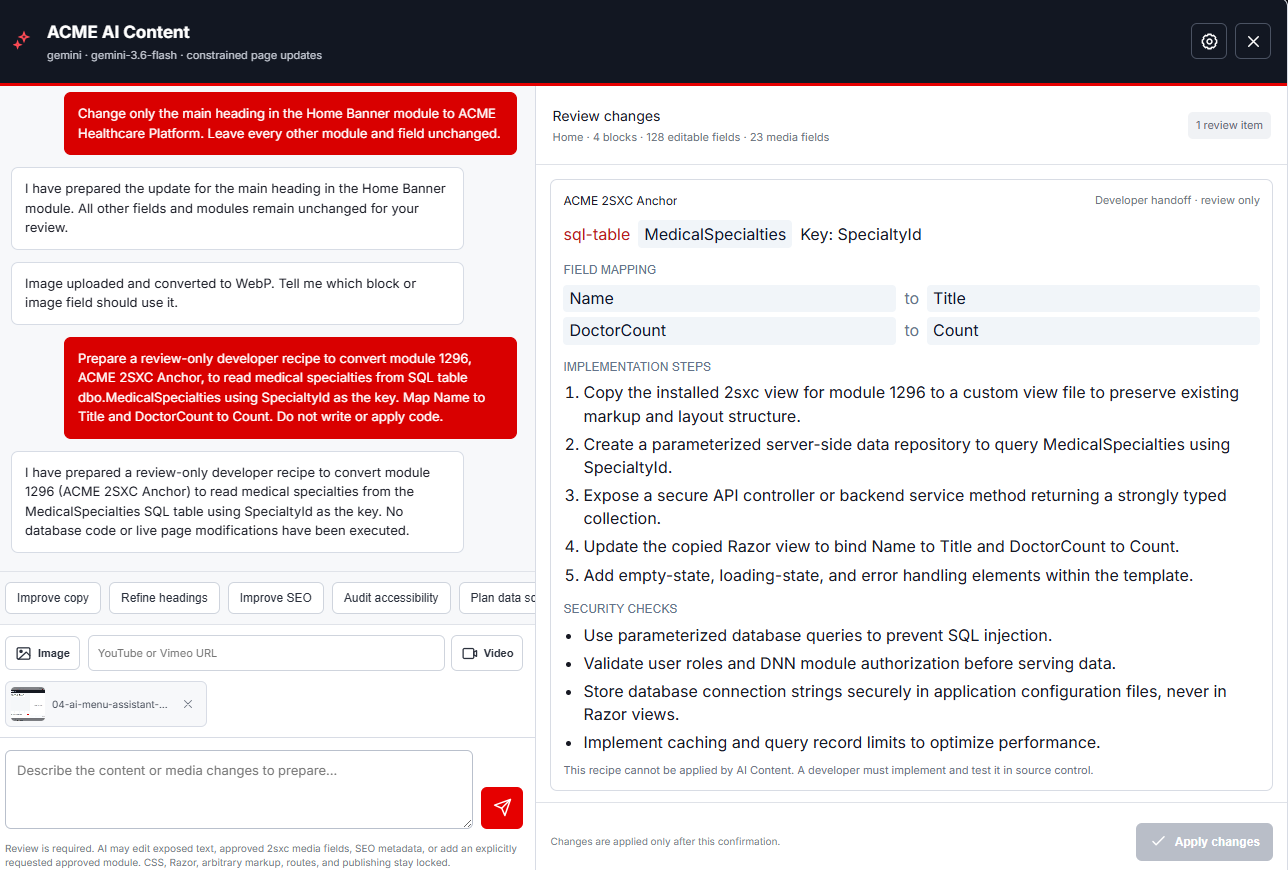 The recipe is a developer handoff. Its Apply button remains disabled because source-code and database work cannot be executed by AI Content.
Prepare a bounded SQL source
This workflow assumes the customer application already owns the SQL table or database view. ACME does not create, migrate, or seed that schema. Confirm that the existing source exposes a stable integer key, a clear display title, an explicit publish flag, and deterministic ordering. The example view reads this shape:
SELECT TOP (12)
  SpecialtyId, Name, DoctorCount, SortOrder
FROM dbo.MedicalSpecialties
WHERE IsPublished = 1
ORDER BY SortOrder, Name;
Use a least-privilege connection and a fixed row limit. If the query accepts filters, use supported query parameters instead of concatenating user input into SQL.
Build a named VisualQuery
- Open the 2sxc app administration and create a query named
MedicalSpecialties.
- Add the SQL Data data source.
- Use the connection name
SiteSqlServer instead of placing a connection string in the query or Razor file.
- Paste the bounded SELECT statement.
- Set Entity ID to
SpecialtyId and Entity Title to Name.
- Connect the result to the query's
Default output and test it in VisualQuery.
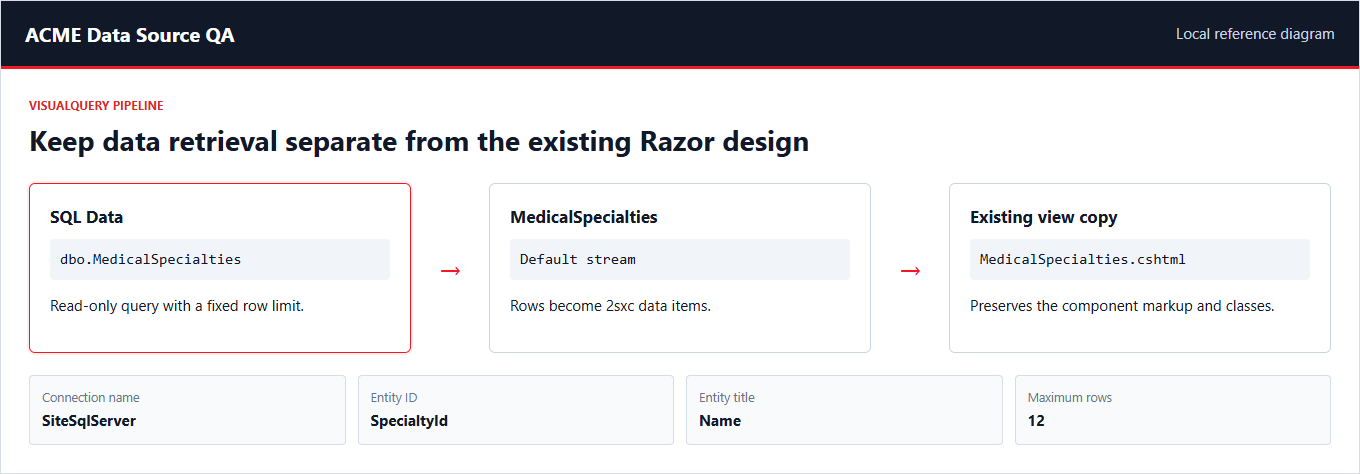 VisualQuery keeps retrieval configuration separate from the component renderer and turns SQL rows into 2sxc data items.
Bind the named query in Razor
Duplicate the nearest existing view and preserve its component markup and CSS classes. In a typed Razor view for 2sxc 21, retrieve the named query and render its items:
@inherits Custom.Hybrid.RazorTyped
@using System.Linq
@{
  var specialties = App.GetQuery("MedicalSpecialties")
    .GetAll()
    .ToList();
}

<section class="acme-healthcare-specialties">
  @if (!specialties.Any()) {
    <p>No specialties are available.</p>
  } else {
    @foreach (var specialty in specialties) {
      <article>
        <h3>@specialty.String("Name")</h3>
        <p>@specialty.Int("DoctorCount") doctors</p>
      </article>
    }
  }
</section>
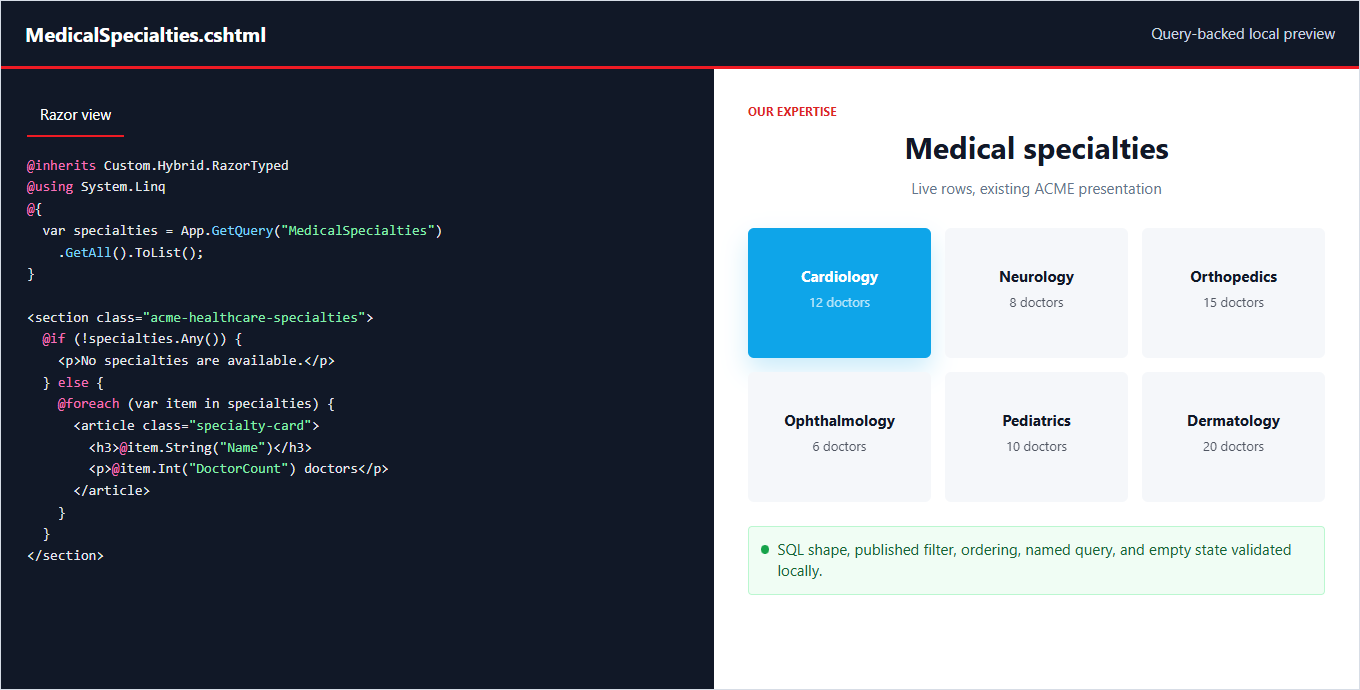 The view reads live rows while retaining the established ACME presentation and a clear empty state.
Keep presentation settings editable
Database rows should supply repeated business data, not every presentation choice. Keep editor-owned values such as the section heading, eyebrow, button label, theme option, or selected view in the existing structured fields. This gives editors normal control without mixing SQL with layout decisions.
Validate before deployment
- Run the SELECT statement with published and unpublished rows; confirm filtering and ordering.
- Test zero rows, one row, the maximum row count, long names, and unexpected null values.
- Confirm the Razor view never opens a SQL connection or reads a connection string.
- Test the component at desktop and mobile widths while signed in and signed out.
- Check accessibility, image fallbacks, caching needs, query performance, and error logging.
- Package the query definition and Razor change from the maintained source rather than leaving a portal-only edit.
2sxc documents SQL rows as entities through its SQL DataSource and recommends VisualQuery when possible because it separates data retrieval from visualization. See the official SQL DataSource reference and DataSource usage guide.