Not rated yet
Push submissions to a CRM or ERP over HTTP
A Webhook node sends the submission to another system as an HTTP request the moment the form is submitted. It is the right tool when the other system speaks HTTP — Salesforce, HubSpot, Dynamics, Odoo, an internal API gateway, an iPaaS such as Zapier or Make, or a bespoke intake endpoint. When the other system is a database rather than an API, use Write submissions into an existing SQL table instead.
Everything below is configured in the builder — no code, no deployment.
[hinh: Webhook to CRM]
1. Where the node lives
- Open the form in the builder.
- Right rail → BPMN tab. The workflow canvas opens.
- From the palette, under User and Service Tasks, drag Service Task (the one badged
API) onto the canvas and connect it after Form submitted. - Click the node to open its configuration.
The palette label is Service Task, because that is the BPMN name for it. Its internal node type is Webhook — the name that appears in exported JSON and in messages such as "No executor registered for node type 'Webhook'".
The panel is titled "Webhook = send this submission to another system" and is organised as Destination → Payload → Advanced options.
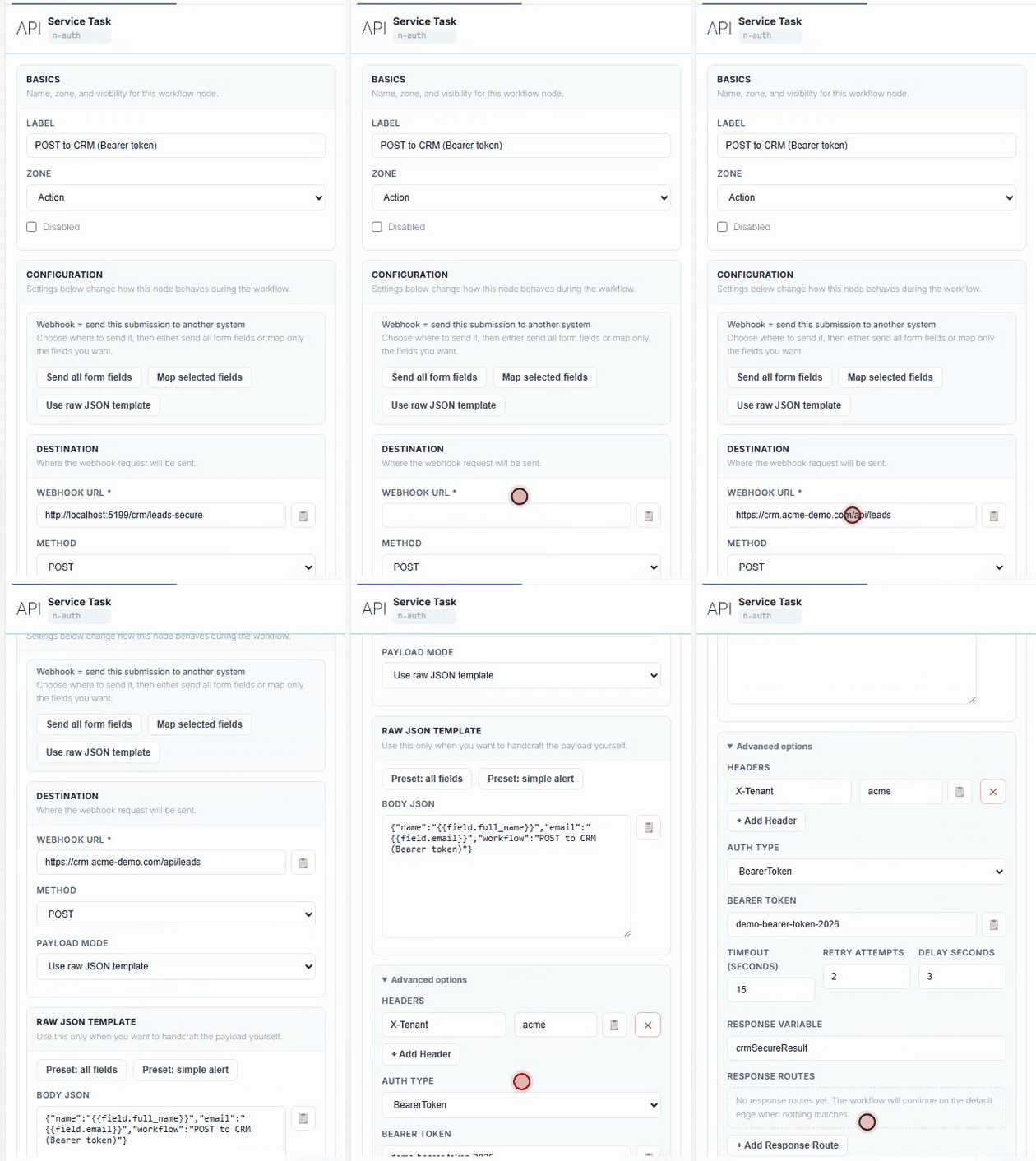
2. Destination
| Field | Meaning |
|---|
| Webhook URL | Absolute http:// or https:// URL. Supports tokens, so https://crm.example.com/api/leads/{{field.region}} resolves per submission. |
| Method | POST (default), PUT, PATCH, GET, DELETE. A body is only sent for POST/PUT/PATCH. |
Tokens available in the URL, headers, body template and fixed values:
{{field.<key>}} — a form field, by key{{form.id}} — the form id- workflow variables set by earlier nodes
3. Payload — three modes
Send all form fields (default). Every field goes out as one flat JSON object, keyed by field key. Nothing to configure; the panel shows a live preview.
{ "full_name": "Emily Carter", "email": "a@example.com", "phone": "0900000000", "message": "Xin chào" }
Map selected fields. Pick exactly which fields leave the building and what each is called on the other side. The JSON key / path accepts dot notation, which builds nested objects — this is how you match a CRM's expected shape:
| Form field | JSON key / path |
|---|
full_name | customer.name |
email | customer.email |
phone | customer.phone |
{ "customer": { "name": "Emily Carter", "email": "a@example.com", "phone": "0900000000" } }
Three shortcuts sit above the table: Auto-map fields (one row per field, same names), Preset: CRM lead (matches name/email/phone keys into customer.*), and Add row. Fixed value overrides the selected field with a constant or a token — use it to stamp source: "website" or tenant: "{{form.id}}".
Use raw JSON template. Handcraft the body. Anything not valid JSON is sent verbatim as the request body, so this mode also covers XML or form-encoded targets.
{
  "event": "megaform.submission",
  "formId": "{{form.id}}",
  "lead": { "name": "{{field.full_name}}", "email": "{{field.email}}" }
}
Field mappings win over the template when both are present.
4. Authentication
Open Advanced options → Auth type. Four choices, and MegaForm adds the header for you.
No authentication
Leave Auth type = None. The panel confirms "No auth header will be added." Suitable when the endpoint is a signed one-off URL — Zapier catch hooks, Make webhooks, Slack incoming webhooks — where the secret is the URL itself.
Then treat the URL as a credential: anyone who can read the workflow can replay it.
Bearer token
Auth type = BearerToken, paste the token into Bearer token. Sends:
Authorization: Bearer <token>
Auth type = ApiKey, set Header name (default X-Api-Key) and API key value. Sends:
X-Api-Key: <value>
Use this for the many CRMs that want a non-standard header — apikey, X-Auth-Token, X-HubSpot-Signature and friends: just change the header name.
HTTP Basic
Auth type = BasicAuth, fill Username and Password / token. MegaForm base64-encodes the pair and sends:
Authorization: Basic <base64(user:pass)>
Advanced options → Headers → + Add Header takes any number of name/value pairs, and the values accept tokens. This covers OAuth2 where you already hold a long-lived token, tenant headers, X-Correlation-Id, and signature headers computed by an earlier node into a workflow variable:
| Header name | Header value |
|---|
X-Tenant | acme |
X-Correlation-Id | {{form.id}}-{{field.email}} |
Authorization | Bearer {{var.oauthToken}} |
OAuth2 client-credentials: MegaForm does not fetch tokens for you. Put a first Webhook node that POSTs to the token endpoint, store the reply with Response variable (oauthToken), then read {{var.oauthToken}} in the second node's header. Two nodes, no code.
Where the secret is stored
Auth values live in the workflow definition on the server. They are not part of the anonymous form schema the public page downloads. They are, however, readable and exportable by anyone with builder access — so use a dedicated integration account with least privilege, and rotate it like any other stored credential.
5. Reliability — timeout and retry
| Setting | Default | Notes |
|---|
| Timeout (seconds) | 30 | Clamped to 1–120. |
| Retry attempts | 3 | Total attempts, not extra attempts. 1 = try once. |
| Delay seconds | 5 | First wait; each retry doubles it, capped at 60s per wait. |
Retries only fire on HTTP 5xx, timeouts and connection errors. A 4xx is treated as a decision by the other system, not a glitch, and is never retried — so a wrong token or a rejected payload fails immediately rather than four minutes later. Design the endpoint accordingly: return 503 when you want MegaForm to come back, 400 when you do not.
6. Reading the answer back
Response variable stores the raw response body under a name later nodes can read as {{var.<name>}} — the CRM's new record id, for example, which a follow-on Database node can write back into your own table.
Response routes branch the workflow on a value inside the JSON response. Each route is JSON path → operator → value → next node id, evaluated top to bottom; the first match wins and the workflow continues at that node. Nothing matching falls through to the default edge.
| JSON path | Operator | Value | Next node id |
|---|
$.status | Equals | needs_approval | node-approval |
$.status | Equals | approved | node-notify |
The path is simple dot notation ($.status, data.code); array indexing is not supported. Operators: Equals, NotEquals, Contains, GreaterThan, LessThan, Exists, NotExists.
7. Calling a CRM that is on your own network
MegaForm refuses webhook URLs that resolve to loopback, private, link-local, carrier-grade-NAT or cloud-metadata addresses. That guard exists because the URL can contain {{field.*}} tokens filled in by an anonymous visitor, which would otherwise turn a public form into a probe of your internal network. A blocked call fails the node with:
Blocked webhook URL: URL targets a blocked (private/loopback/metadata) address
If the receiving system only answers on an internal address, give it a hostname your DNN server can resolve and reach — normally a reverse proxy or an internal DNS name in front of it — and point the node at that. What the guard inspects is the address the URL resolves to, so a public-looking hostname that resolves to an internal address is still refused.
Whether a server may call private addresses at all is a decision for whoever administers that server, not a per-form setting, and there is deliberately no switch for it in the form builder: a URL assembled from an untrusted field would then be able to reach anything the server can reach.
8. Testing before you trust it
Point the node at a staging endpoint of the receiving system while you are still changing it, never at production. Two things to lean on before the first real submission:
- Test, on the workflow canvas toolbar, runs the graph as a dry run and highlights the nodes it walked — enough to confirm the webhook is on the path and that your response routes branch where you meant them to, without submitting anything.
- Validate BPMN refuses to publish a node that cannot run: a webhook with no URL is reported as "Webhook 'x': URL is required."
Once a call does go out, the node's own error text is the first thing to read — §10 lists the ones that come up most.
9. Node JSON, for reference
The builder writes this; you rarely type it. Useful when reviewing an exported workflow.
{
  "type": "webhook",
  "config": {
    "url": "https://crm.example.com/api/leads",
    "method": "POST",
    "payloadMode": "mappedFields",
    "bodyMappings": [
      { "formFieldKey": "full_name", "bodyPath": "customer.name" },
      { "formFieldKey": "email",     "bodyPath": "customer.email" },
      { "formFieldKey": "phone",     "bodyPath": "customer.phone" },
      { "bodyPath": "source", "staticValue": "website" }
    ],
    "headers": { "X-Tenant": "acme" },
    "auth": { "type": "BearerToken", "value": "<token>" },
    "timeoutSeconds": 30,
    "retry": { "maxAttempts": 3, "delaySeconds": 5, "backoffMultiplier": 2 },
    "responseVariableKey": "crmResult",
    "responseRoutes": [
      { "jsonPath": "$.status", "operator": "Equals", "value": "needs_approval", "nextNodeId": "node-approval" }
    ]
  }
}
auth.type is one of None, BearerToken, BasicAuth, ApiKey. For ApiKey add "headerName": "X-Api-Key"; for BasicAuth add "username": "...".
10. Troubleshooting
| Symptom | Cause |
|---|
Blocked webhook URL: … blocked (private/loopback/metadata) address | Target is on a private network — see §7. |
Blocked webhook URL: only http/https URLs are allowed | Scheme is not http/https. |
Webhook HTTP 401 / 403 | Auth type or value wrong. Check §4 against what the endpoint expects — and remember 4xx is never retried. |
Webhook HTTP 0: Request timed out. | Endpoint slower than Timeout; raise it (max 120s) or make the endpoint async. |
Webhook URL is empty after template resolution. | The URL is only tokens and the tokens resolved to nothing — usually a field key that does not exist. |
| Node never runs | It is not connected to the path being taken, or the node is disabled. |
| Body arrives empty | Method is GET or DELETE; MegaForm sends no body on either. |
See also: Workflow · Write submissions into an existing SQL table